Submitting Jobs
This page explains how to use our compute cluster to run jobs in parallel and speed up your analyses.
How to run tasks on the cluster
The main command for submitting jobs on the cluster is fsl_sub. Type the following to get the usage:
Typing fsl_sub before the rest of your command will send the job to the cluster. For example, to run FSL's BET on the cluster:
!> Before submitting any tasks make sure you have loaded any shell modules you require (e.g. for FSL, type module add fsl).
You can also submit a text file with a list of tasks that will then run in parallel. For example, to run BET on a list of subjects:
for subj in 001 002 003;do
    echo bet ${subj}/struct.nii.gz ${subj}/struct_brain.nii.gz >> commands.txt
done

fsl_sub -N bet_jobs -t commands.txt
For more details on how to use the fsl_sub options see the Advanced Usage section.
!> The command you submit cannot run any graphical interface, as they will have no where to display the output.
Queues
The compute cluster is managed by a scheduler, whose job is to make efficient use of the resources and ensure fairness in resource allocation.
To help the scheduler achieve this, you can specify a queue when using fsl_sub. Typing fsl_sub --help gives you a list of "queues" available for use with descriptions of allowed run times and memory availability. This information can also be found here.
By default, fsl_sub will submit your task to the short queue (max 1.2day runtime). fsl_sub can automatically choose a queue for you if you provide information about your job's requirements. We would strongly recommend that you provide at least an estimated maximum run time (--jobtime).
For example, to queue a job which requires 10GiB of memory and runs for 2 hours use:
See Why do I need to specify RAM and Time? for more information, and How much RAM/Time does my job need to assist with setting these.
?> The term queue is a bit of a misnomer. At OxCIN, we use the SLURM scheduler, which uses the concept of partitions, i.e. sub-sets of the cluster that do different things and have different hardware. When you choose a queue, you are actually choosing a partition.
The different partitions have different run-times and memory limits, when a task reaches these limits it will be terminated; also shorter queues take precedence over the longer ones. It is advantageous to provide the scheduler with as much information about your job's memory and time requirements.
How to monitor your jobs on the cluster
You may want to know how your jobs are doing, if they have finished running, or if there has been an error. The command for this is squeue:
This will give you a table with information on your jobs. An example of which is shown below:
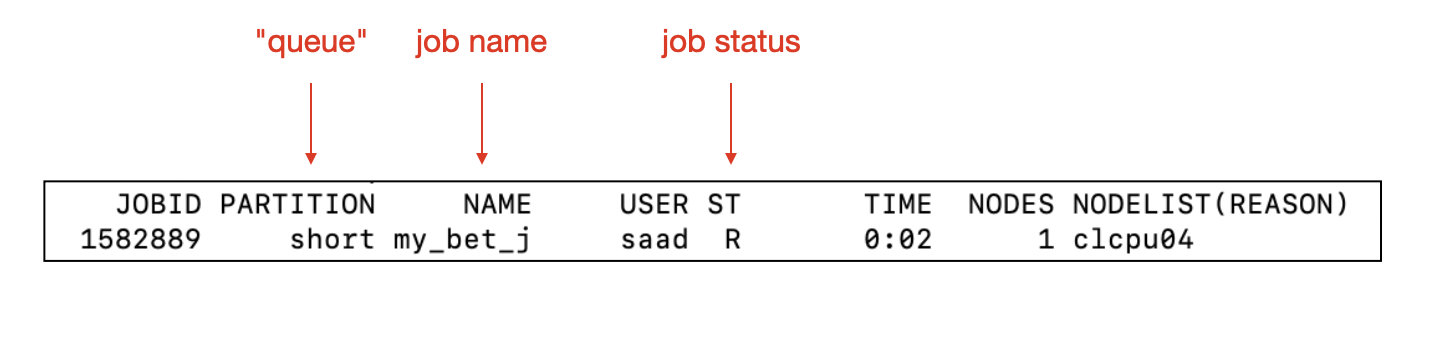
Your jobs will produce two text files that are useful for troubleshooting, and output file and an error file:
- jobName.oXXXXXXX : Output messages from the programme that you have submitted.
- jobName.eXXXXXXX : Error messages logged by the programme that you have submitted. If no errors, this should be an empty file.
You can peek inside these files from the command line, e.g.:
?> XXXXXXX refers to the 7-digit job ID.
Auto-submitting software
Some FSL commands and GUIs automatically queue themselves where appropriate, i.e., you do not need to use fsl_sub to submit these programs. Examples include FEAT, TBSS, and BedpostX. If you do submit one of these tools to the queues then they will still run, but may not be able to make full use of the cluster resources (e.g. not be able to run multiple tasks in parallel).
For these auto-submitting software, you can still specify the memory you expect the task to require with the environment variable FSLSUB_MEMORY_REQUIRED. For example:
will submit a FEAT task informing fsl_sub that you expect to require 32GiB of memory.